Booking system for homeowners communities — Free with Apoing
Mainly for: Residents
Does your community have a pool, a padel court, a social room or a barbecue area, and is it hard to organise who uses them?
Do the same people always get the best slots?
Do you still have to go down to a notice board or write in a chat group to book?
With Apoing's booking system, you get a reservation tool for your homeowners community that solves all of these problems — free of charge. Any resident can book the pool, the court or the room from their phone or computer and, if the administrator turns on the Reminder rule, they get a notice a few hours before their booking.
The system applies the rules by itself: nobody can bypass them. In addition to setting schedules and slot lengths, the administrator can limit bookings per home per week or per day and turn on automatic rules such as fair turn to ensure fair use of the facilities for all residents.
Simple, transparent calendar
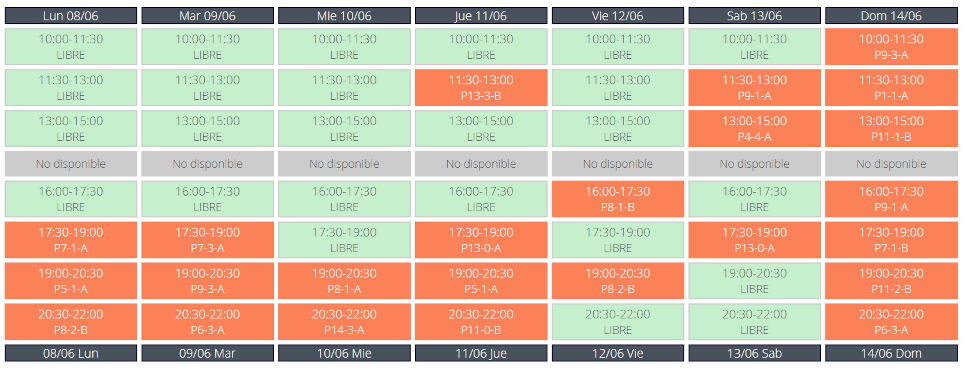
The booking grid is clean and easy to use. On a phone each resident sees the day's free slots and, if they turn the phone sideways, the whole week; on a computer, the week. They book by tapping the time they want and cancel from the booking itself or from My bookings.
The grid shows which home holds each booking (by its code, for example 1-3-B), making the system open and transparent for the entire community.
The community's homes
You create the list of homes (by entrance, floor and door) and each resident picks theirs when joining; you validate it. The home is their booking code: people from the same household share the booking limits and, in per-home polls, one vote. All about it in Homes.
Available 24/7
The system is available around the clock, 365 days a year, on the web and in the app for Android and iPhone, so residents can book from anywhere, whenever it suits them.
More than bookings
From the same place you can publish notices on the feed, receive and answer incidents, run advisory polls, share documents (minutes, rules, circulars) and call meetings.
Simple registration
All it takes to sign up is a name and an email address (or a Google account). The email identifies the account and is where the notices each person chooses arrive. Quick and painless.
And the best part: it's free for residents and administrators alike.
How do I get started?
Check out the step-by-step guide: How to create your community in Apoing. If you have many residents to add, you can also import the homes and residents at once from a spreadsheet.
🔑 Automate access and lighting
With the Apoing API you can connect automatic doors and facility lighting to the booking system. Lights turn on automatically when a booking is active, and users access the facility with a PIN generated in the app. Compatible with Shelly, Sonoff and Raspberry Pi. View technical documentation →
Frequently asked questions
How do I stop one resident from taking all the booking slots?
In the booking conditions you can limit how many bookings each home has per week or per day. In addition, with the Fair turn automatic rule, whoever has booked most recently can book a little later than everyone else, so residents who have used the facility less get priority.
Can two people from the same household share booking limits?
Yes. People from the same home (the same booking code) share the same limits, so having two accounts in the same home does not double the number of bookings available. With the list of homes, each resident picks theirs when joining and you validate it.
Can I manage both the pool and the padel court with the same system?
Yes. You can create as many calendars as your community has facilities, each with its own schedule and booking conditions. The pool can be set up with capacity control to limit the maximum number of swimmers per time slot.
What happens if a resident doesn't show up for their booking?
You can turn on the No-show and Late cancellation automatic rules (Pro · free for now): whoever doesn't turn up several times (you mark it with “No-show”) or cancels at short notice can't book for a few days, and gets an email explaining why.
How do I add all residents at once?
From Homes you download your list of homes, type each resident's email next to theirs and upload it again: each one gets an invitation with their home. You can also use bulk import with a spreadsheet of emails and booking codes. Each resident gets an invitation that they accept when they register on Apoing.