Booking penalties in Apoing — How to set them up
This feature ensures that the facilities linked to a calendar are used more fairly among all users. The goal is to prevent the same users from always grabbing the best time slots.
The idea is to "penalize" heavy users by giving an advantage to those who use the calendar less, so everyone gets fair access to the facilities.
How does it work?
The administrator configures a penalty time in minutes for each booking. When a penalized user tries to book a slot, they must wait that extra number of minutes after the slot becomes available.
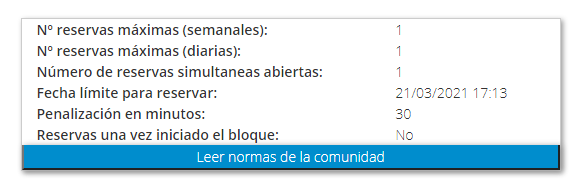
In the calendar, each user can see their accumulated penalty along with the deadline up to which they can make bookings.
Example
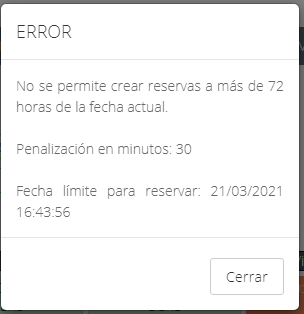
Say the community allows bookings up to 72 hours in advance and today is 03/18/2021 at 5:13 PM. A user with a 30-minute penalty won't be able to book the slot on 03/21/2021 at 5:00 PM until 5:30 PM on 03/18/2021, while a user with no penalty could book it starting at 5:00 PM.
How is the penalty calculated?
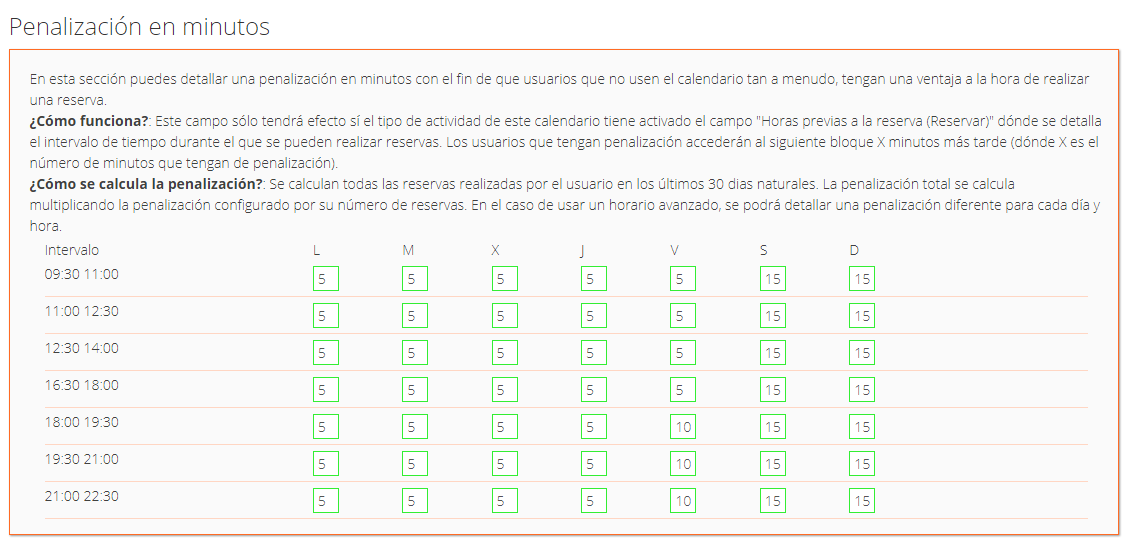
The administrator assigns a number of penalty minutes per booking from the calendar editor. With advanced scheduling, different penalties can be set by time slot or day of the week (for example, applying heavier penalties for weekend bookings).
A user's total penalty is the sum of all their booking penalties over the past 30 calendar days.
Requirement
This feature only takes effect if the calendar's activity type has the "Hours before booking (Book)" field configured, which defines the window during which bookings can be made.