Booking system for homeowners communities — Free with Apoing
Does your community have a padel, tennis, or soccer court that's hard to manage?
Do residents ignore the booking schedule?
Do you still have to walk over to a physical bulletin board just to make a reservation?
With Apoing's booking system, you get a reservation tool for your homeowners association that solves all of these problems — completely free of charge. Any resident can book the community court from any internet-connected device, and they'll receive an email reminder on the day of their booking.
The system prevents players from bypassing the booking rules. In addition to configuring schedules and time slots, the administrator can limit weekly bookings and activate penalties to ensure fair use of the facilities for all residents.
Simple, transparent calendar
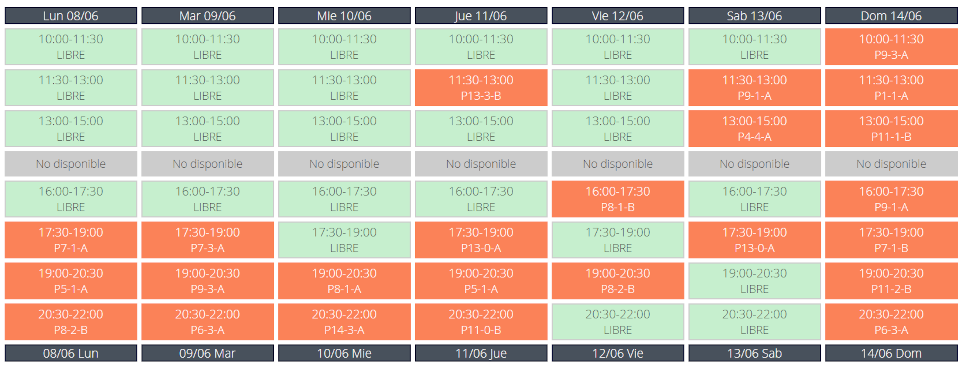
The booking grid is clean and easy to use. Users see the current week and can pick any time slot they want with a single tap. Canceling a booking works the exact same way.
The grid shows which resident holds each reservation, making the system open and transparent for the entire community.
Available 24/7
The system is available around the clock, 365 days a year — residents can book the facilities from anywhere, whenever it's convenient for them.
Simple registration
All it takes to sign up is a name and an email address, which serves as both the user ID and the notification address. Quick and painless.
And the best part: it's completely free — for residents and administrators alike.
How do I get started?
Check out the step-by-step guide: How to create your community in Apoing. If you have many residents to add, you can also import them all at once from a spreadsheet.
🔑 Automate access and lighting
With the Apoing API you can connect automatic doors and facility lighting to the booking system. Lights turn on automatically when a booking is active, and users access the facility with a PIN generated in the app. Compatible with Shelly, Sonoff and Raspberry Pi. View technical documentation →
Frequently asked questions
How do I stop one resident from taking all the booking slots?
The system lets you set a maximum number of weekly bookings per user. You can also enable the penalty system, which adds waiting time for heavy users and automatically gives priority to residents who book less frequently.
Can two people from the same household share booking limits?
Yes. If you assign the same booking code (e.g. flat or unit number) to members of the same household, the system links them so they share the same weekly limits. Having two accounts in the same home does not double the number of bookings available.
Can I manage both the pool and the padel court with the same system?
Yes. You can create as many calendars as your community has facilities, each with its own schedule and booking conditions. The pool can be set up with capacity control to limit the maximum number of swimmers per time slot.
What happens if a resident doesn't show up for their booking?
You can enable the penalty system, which accumulates waiting time for residents who book frequently. This discourages unused reservations and ensures all residents have an equal opportunity to access the facilities.
How do I add all residents at once?
With the bulk import feature, you can upload a spreadsheet with your residents' email addresses and booking codes. Each resident will receive a pending invitation to accept when they register on Apoing.